ODBC Source Connector
The ODBC source connector lets DataSync retrieve data from any ODBC-compliant data source and load it into your data warehouse. Once your source connection is ready, configure your destination connection to finish the setup.
Create the source connection in DataSync
- Log in to DataSync.
- From the welcome screen, select Connections.
- Next to Source Connections, click New.
- Select ODBC.
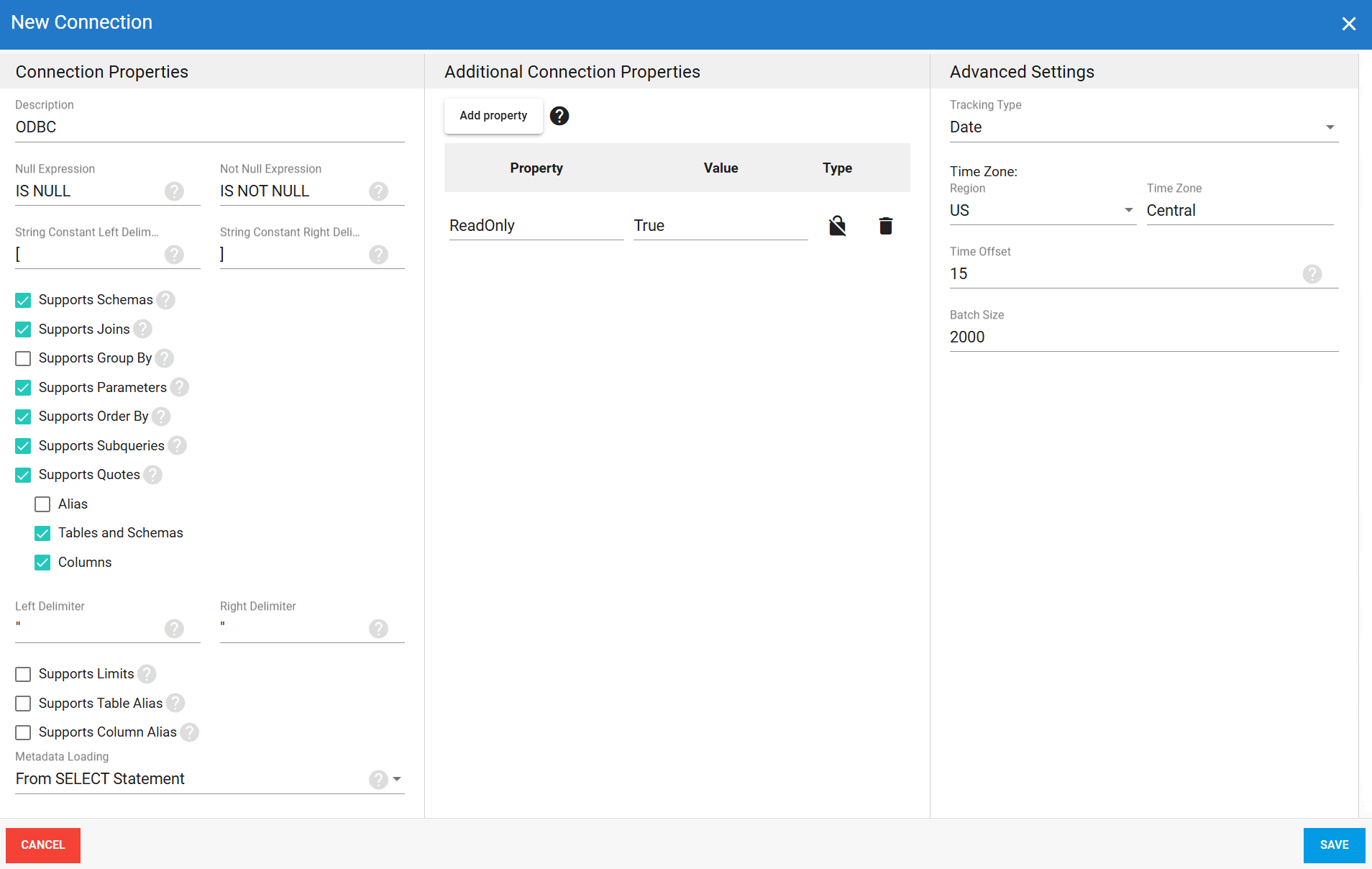
- Enter all required connection properties.
- (Optional) In the Additional Connection Properties panel, click Add property and enter any extra parameters you need.
- Configure the advanced settings to match your environment, including Tracking Type.
- Click Save.
Connection properties
The Supports settings are checkboxes that tell DataSync which SQL features your data source is capable of. Check each one that applies to your data source.
| Property | What to enter |
|---|---|
| Description | Unique name for the connection. Example: ODBC |
| Null Expression | SQL expression used to check for NULL values. Example: IS NULL. |
| Not Null Expression | SQL expression used to check for non‑null values. Example: IS NOT NULL. |
| String Constant Left Delimiter | Opening character used to wrap string constants or identifiers in SQL statements. Example: [. |
| String Constant Right Delimiter | Closing character used to wrap string constants or identifiers in SQL statements. Example: ]. |
| Supports Schemas | Organizes tables into schemas. |
| Supports Joins | Supports SQL JOIN operations. |
| Supports Group By | Supports the SQL GROUP BY clause. |
| Supports Parameters | Supports named or positional parameters in queries. |
| Supports Order By | Supports the SQL ORDER BY clause. |
| Supports Subqueries | Supports subqueries. When disabled, SQL can still be used in table definitions, but filtering and previewing values in transformations will not work. |
| Supports Quotes | Supports quoting for aliases, schemas, tables, and columns. When enabled, set the Left Delimiter and Right Delimiter characters used to wrap identifiers in SQL statements. Example: ". |
| Supports Limits | Supports limiting the number of rows returned by a query. |
| Limit Type | Syntax used by the data source to limit query results. Select the format that matches your data source:
|
| Limit Position | Where the limit expression is placed in the SQL query:
|
| Supports Table Alias | Supports table aliases in SQL statements. Keyword used before table aliases: AS uses the AS keyword before the alias and White Space uses a space without AS. |
| Supports Column Alias | Supports column aliases. Keyword used before column aliases: AS uses the AS keyword before the alias and White Space uses a space without AS. |
| Metadata Loading | How DataSync determines the data type of each column:
|
Additional connection properties
Use this panel to enter connection string properties not available in the Connection Properties panel. For sensitive values such as passwords, set the type to Encrypted. The value is hidden in the interface and stored encrypted in the back end.
| Property | What to enter |
|---|---|
| Property | Connection string property that defines the action or behavior. Example: ReadOnly |
| Value | Value for the property. Example: True |
| Type | Visibility settings: Visible or Encrypted. |
Advanced settings
These settings control how the connector tracks data changes, handles time and regional configuration, and processes records during extraction. Configure them to match your ODBC environment so that results stay accurate and consistent.
| Setting | What to select |
|---|---|
| Tracking Type | Method for tracking data changes: None or Date. |
| Region | Region setting for the connector, if required by your setup. |
| Time Zone | Time zone matching your ODBC environment. |
| Time Offset | Refresh offset in seconds to compensate for timing issues in record selection. Minimum 0, maximum 3600. |
| Batch Size | Number of records processed per batch during extraction. Larger batches can improve performance but use more memory. Default is 2000, maximum is 10000. Adjust based on your network speed and disk performance. The default works well in most cases. |
Example setup