Active Directory Source Connector
The Active Directory source connector lets DataSync retrieve data from Active Directory server and load it into your data warehouse. It supports both unencrypted connections and secure connections over TLS/SSL. Once your source connection is ready, configure your destination connection to finish the setup.
The Active Directory connector supports only the Truncate and Load option for running extractions.
Create the source connection in DataSync
- Log in to DataSync.
- From the welcome screen, select Connections.
- Next to Source Connections, click New.
- Select Active Directory.
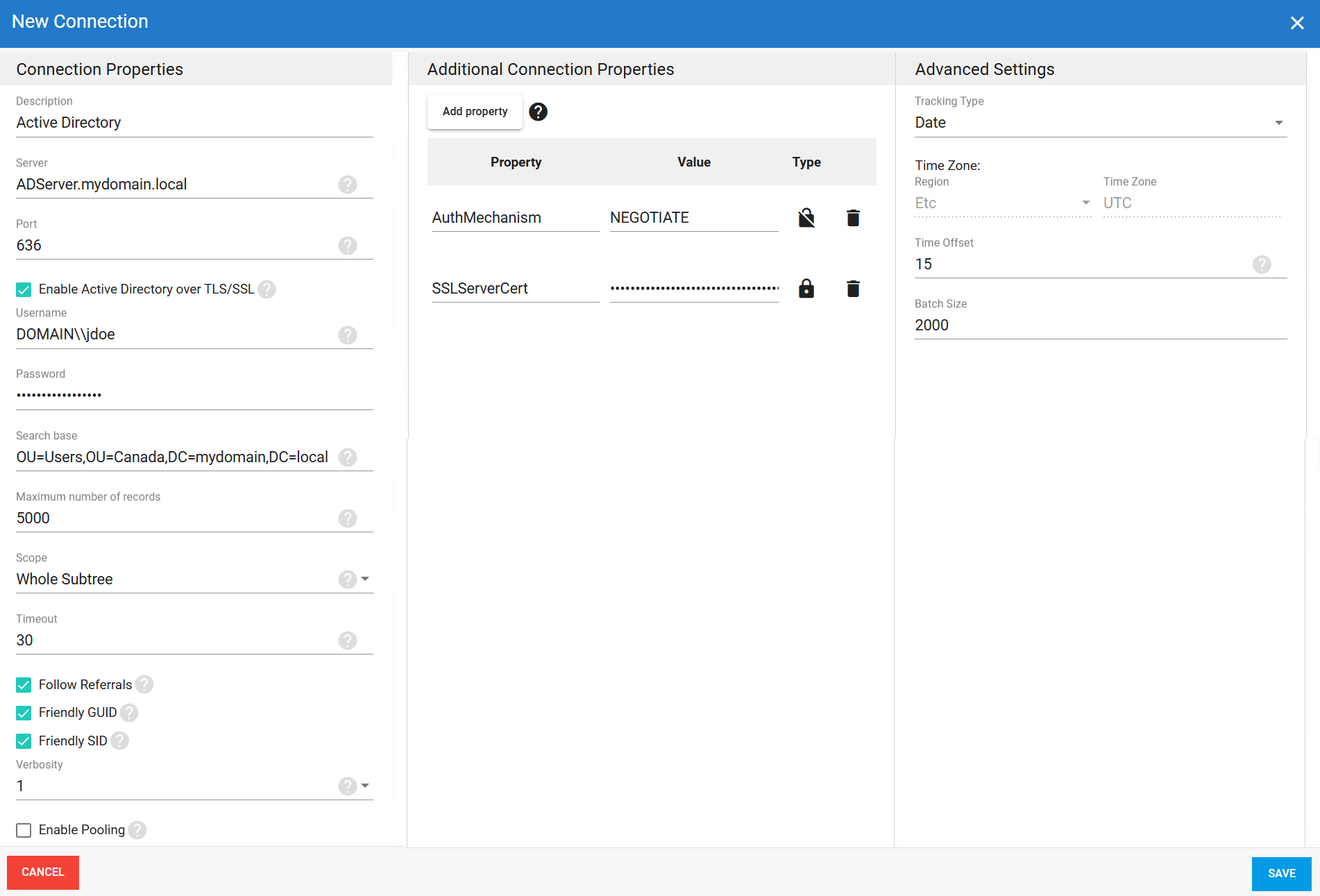
- Enter all required connection properties.
- (Optional) In the Additional Connection Properties panel, click Add property and enter any extra parameters you need.
- Configure the advanced settings to match your environment, including Tracking Type.
- Click Save.
Connection properties
| Property | What to enter |
|---|---|
| Description | Unique name for the connection. Example: Active Directory. |
| Server | Domain name of the Active Directory server. Example: ADServer.mydomain.local. |
| Port | Port the Active Directory server is running on. Default: 389. If you enable Enable Active Directory over TLS/SSL, use port 636 instead. |
| Enable Active Directory over TLS/SSL | Secures the connection using TLS/SSL encryption. |
| Username | Login account in domain format. Example: DOMAIN\\jdoe. |
| Password | Password for this account. |
| Search base | Base distinguished name (DN) for queries. Set to the root directory or a specific subtree. Example: DC=mydomain,DC=local or OU=Users,OU=Canada,DC=mydomain,DC=local. |
| Maximum number of records | Maximum number of records returned. Set to -1 for no limit. |
| Scope | Depth of the directory search.
|
| Timeout | Time in seconds to wait before a connection attempt or query execution times out. |
| Follow Referrals | Follows referrals returned by the Active Directory server to retrieve data from other directory partitions. |
| Friendly GUID | Controls how GUID attributes such as objectGUID are returned. When enabled, values are returned as readable strings. Example: 708d9374-d64a-49b2-97ea-489ddc717703. When disabled, values are returned as base64-encoded strings. |
| Friendly SID | Controls how SID attributes such as objectSID are returned. When enabled, values are returned as readable strings. Example: S-1-5-21-4272240814-246508344-1325542772-12464. When disabled, values are returned as base64-encoded strings. |
| Verbosity | Controls how much detail the connector writes to the log. Each level includes everything from the level below it, plus additional detail.
|
| Enable Pooling | Enables connection pooling, which keeps a set of database connections open and reuses them across extractions instead of opening a new connection each time. This reduces overhead and improves performance when multiple extractions run at the same time. |
| Pool idle timeout | Time in seconds a connection can stay idle before returning to the pool. |
| Max Pool Size | Maximum number of connections allowed in the pool at the same time. |
| Pool wait time | Time in seconds DataSync waits for an available connection before throwing an error. |
Additional connection properties
Additional connection string properties not specified in the Connection Properties panel. For each property added, you can choose Visible or Encrypted. Selecting Encrypted hides the value from the interface and stores it encrypted in the back end, such as when defining passwords.
| Property | What to enter |
|---|---|
SSLServerCert | Certificate used to validate the TLS/SSL connection. If not specified, any certificate trusted by the machine is accepted. Accepted formats:
|
AuthMechanism | Authentication mechanism used for the connection.
|
Advanced settings
These settings control how the connector tracks data changes, handles time and regional configuration, and processes records during extraction.
| Setting | What to select |
|---|---|
| Tracking Type | Method for tracking data changes: None or Date. |
| Region | Fixed to Etc for this connector. |
| Time Zone | Fixed to UTC for this connector. |
| Time Offset | Refresh offset in seconds to compensate for timing issues in record selection. Minimum 0, maximum 3600. |
| Batch Size | Number of records processed per batch during extraction. Larger batches can improve performance but use more memory. Default is 2000, maximum is 10000. Adjust based on your network speed and disk performance. The default works well in most cases. |
Example setup