Pro Forma Invoices
The Pro Forma Invoices Writeback template creates pro forma invoices for construction projects in Acumatica directly from a workbook. You can use the template to prepare progress billing, time and material billing, or pro forma invoices that combine both, and review them before they are released to accounts receivable. It uses the NECWRITEBACK formula, generated with the Writeback Wizard, to send changes from your workbook back to Acumatica.
Write a pro forma invoice back to Acumatica
- Fill in Project, Invoice Date, and Financial Period in the invoice header.
- Click Create Ref Number.
- Enter the lines in the progress billing or time and material section.
- Check the invoice totals, then click Push to Acumatica.
- Click Reset before you start another pro forma invoice.
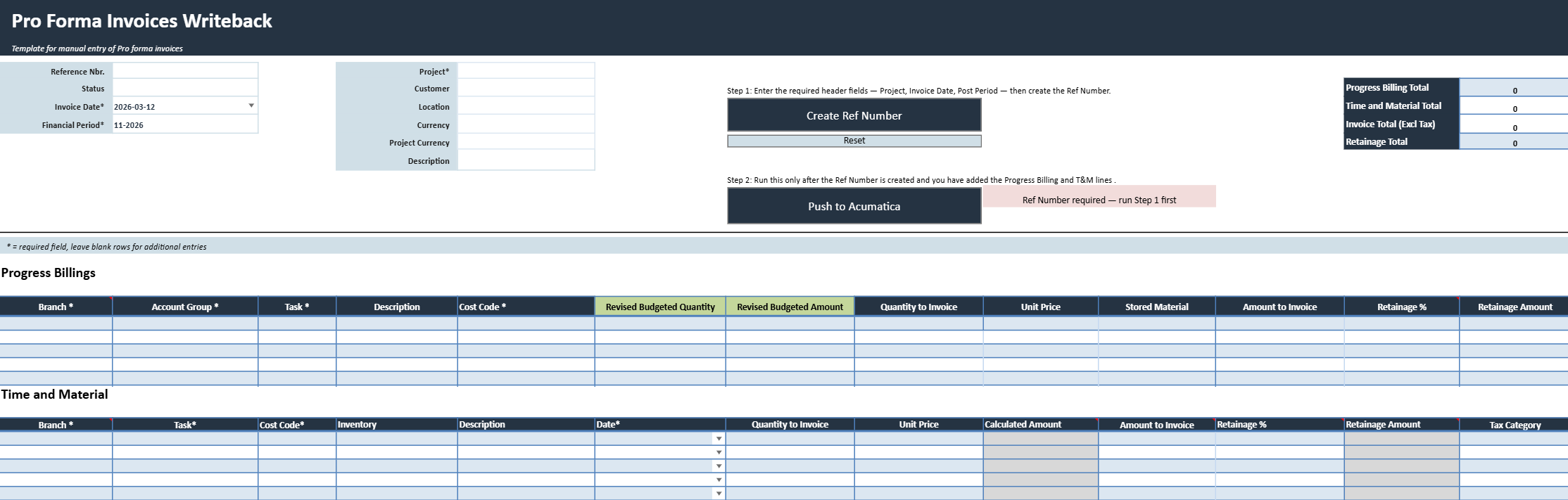
Pro forma invoice header fields
The invoice header holds the information that applies to every billing line of the pro forma invoice. Fields marked with an asterisk (*) are required, and you need to fill them in before you click Create Ref Number.
| Header field | What it contains |
|---|---|
| Reference Nbr. | Pro forma invoice reference generated by Acumatica after selecting Create Ref Number. The populated value links to the created document. |
| Status | Current status of the pro forma invoice in Acumatica. |
| Invoice Date * | Date assigned to the pro forma invoice. |
| Financial Period * | Financial period in which the invoice will be recorded. |
| Project * | Project associated with the pro forma invoice. |
| Customer | Customer associated with the selected project. |
| Location | Customer location used for the invoice. |
| Currency | Currency of the pro forma invoice. |
| Project Currency | Currency defined for the selected project. |
| Description | Brief description of the pro forma invoice. |
Pro forma invoice totals
The totals summarize the billing entered in the template.
- Progress Billing Total shows the total amount of the progress billing lines.
- Time and Material Total adds up the amounts of the time and material lines.
- Invoice Total (Excl Tax) combines both sections into the invoice amount before tax.
- Retainage Total sums the retainage applied across the invoice.
Writeback actions
| Writeback action | What it does |
|---|---|
| Create Ref Number | Creates the initial pro forma invoice in Acumatica and returns its reference number. Complete the required header fields before running this action. Billing lines cannot be pushed until the reference number has been created. |
| Push to Acumatica | Validates the completed billing sections and writes the progress billing and time and material lines to the previously created pro forma invoice. A confirmation message indicates whether the writeback succeeded. |
| Reset | Clears the current pro forma invoice entry so the template can be used for another invoice. Use this only after the current invoice has been successfully written back or is no longer needed. |
Progress billing lines
The progress billing section bills the project based on contract progress, completed work, or scheduled billing amounts. On each line, enter the project, task, billing, retainage, tax, and account information. The progress billing lines add up to the Progress Billing Total and count toward the Invoice Total (Excl Tax).
Time and material lines
The time and material section bills quantities, services, expenses, or other project transactions one line at a time. Columns marked with an asterisk (*) are required on every line you fill in.
| Time and material column | What it contains |
|---|---|
| Branch * | Branch assigned to the billing line. |
| Task * | Project task associated with the line. |
| Cost Code * | Project cost code associated with the line. |
| Inventory | Inventory item, labor item, or service associated with the line, when applicable. |
| Description | Description of the billed item, service, or transaction. |
| Date * | Transaction or billing date assigned to the line. |
| Quantity to Invoice | Quantity to include on the pro forma invoice. |
| Unit Price | Billing price per unit. |
| Calculated Amount | Amount calculated from the quantity and unit price or sourced from the underlying project transaction. |
| Amount to Invoice | Amount to include on the pro forma invoice. |
| Retainage % | Percentage of the line amount to retain. |
| Retainage Amount | Retainage amount calculated or entered for the line. |
| Tax Category | Tax category used to determine applicable taxes. |
| Sales Account | Revenue account associated with the billing line. |
| Progress Billing Basis | Progress billing reference or basis associated with the line, when applicable. |