Data Model Parameters
The Data Model Parameters dialog defines dynamic variables that inject values into a data model. Parameters can act as variables in calculated columns or appear in column headings. When you open a view, report, dashboard, or workbook, the data loads based on the values you set in the dialog. Parameters make your data models more flexible by letting you adjust what data loads without changing the underlying model.
When to use data model parameters
- Filtering dynamic data: Filter data in real time based on your input instead of modifying the data model itself.
- Customizing user inputs: Build visualizations that require user-specific values so the output is tailored to your needs.
- Adapting queries without editing them: Pass different values into the same query structure without touching the base configuration.
- Reducing dataset size: Limit the data loaded to only what matches your conditions, which improves load times and reduces resource usage.
- Testing different scenarios: Swap parameter values to compare outcomes quickly without altering the underlying data model.
Set data model parameters
If any fields in the visualization use a data model parameter, the Data Model Parameters dialog opens automatically when the visualization loads.
- Open a view, report, dashboard, or workbook.
- Enter a value for each parameter. Select the prompt button beside a field to see the available values.
- Select Confirm, or Skip to load the visualization using the default values.
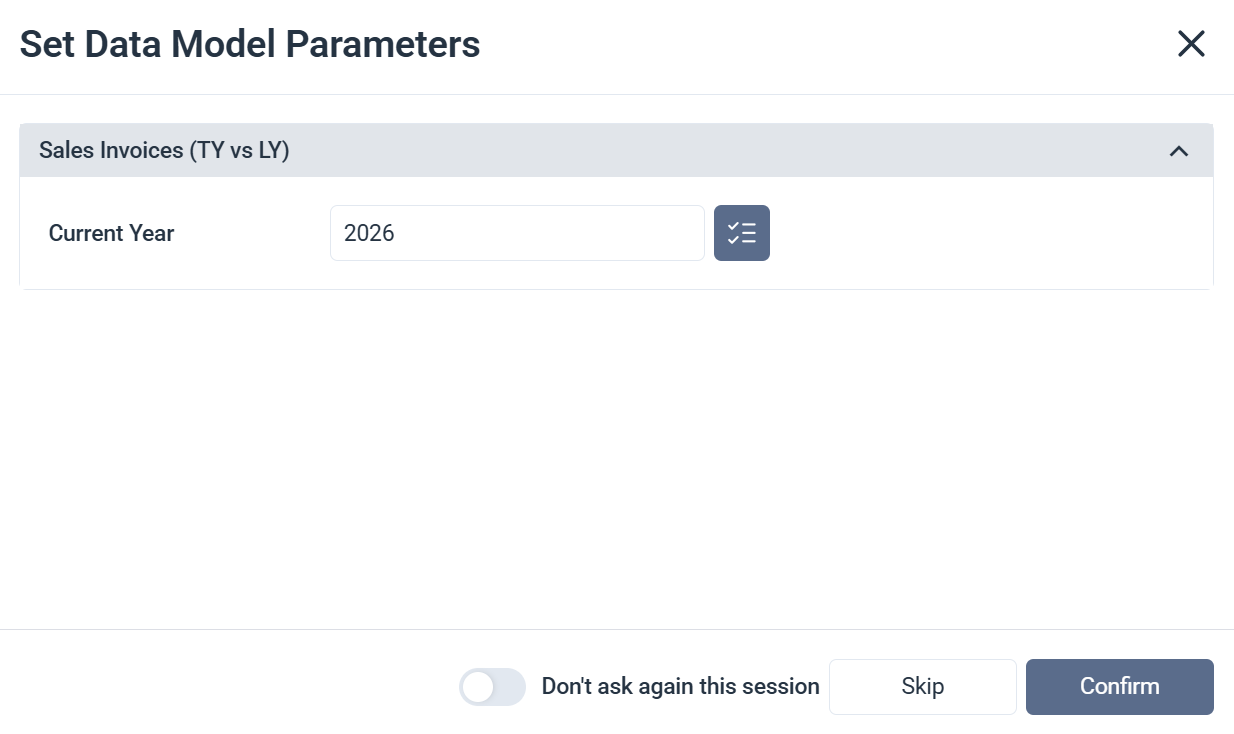
Data Model Parameters properties
| Option | What it does |
|---|---|
| Parameters | The list of parameters required to load data for the fields in the visualization. |
| Prompts | A button beside each input field that shows the available values for that parameter. |
| Don't ask again this session | Saves your current parameter values for the rest of the session. The dialog won't open again until your next session. |
| Skip | Closes the dialog and loads the visualization using the default parameter values. |
| Confirm | Applies your parameter values and loads the visualization. |