Journal Entry
The Journal Entry Writeback template creates balanced general ledger (GL) journal entries in Sage Intacct directly from a workbook. You can use the template for month end adjustments, accruals, reclassifications, intercompany entries, and other manual GL transactions that contain several debit and credit lines. It uses the NECWRITEBACK formula, generated with the Writeback Wizard, to send changes from your workbook back to Sage Intacct.
Write a journal entry back to Sage Intacct
- Fill in the journal entry header.
- Enter the debit and credit lines in the transaction grid.
- Review the journal entry in the Validation column and the Batch Check table, then click Push to Intacct.
- Click Reset before you start another journal entry.
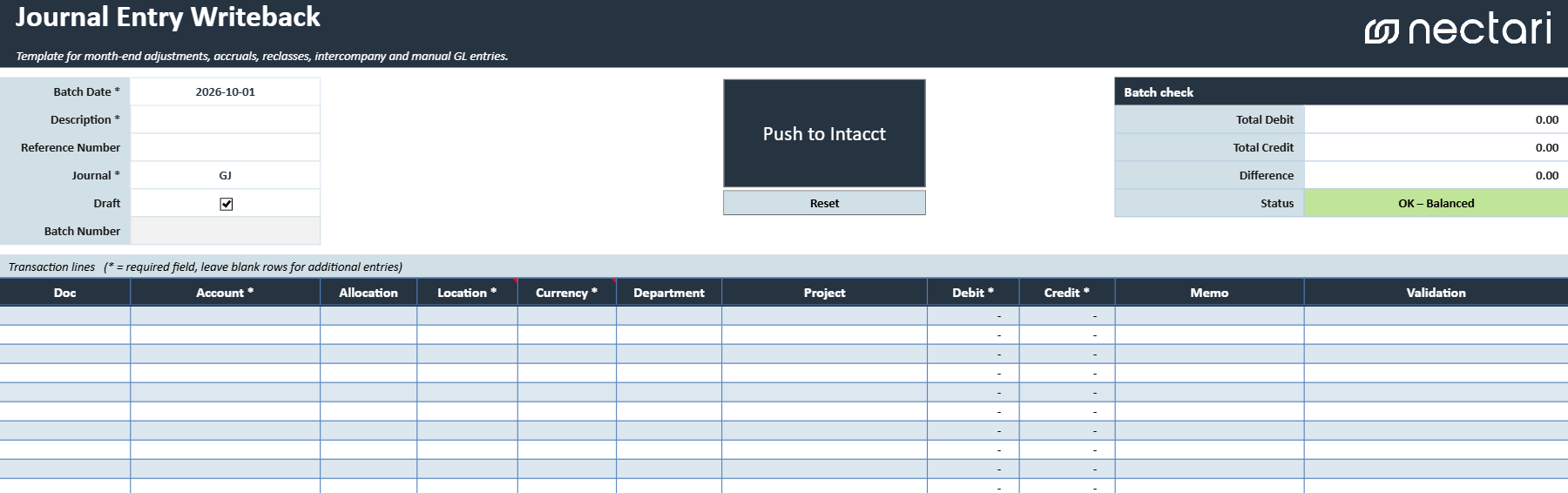
Journal entry header fields
The journal entry header holds the information that applies to every line of the journal entry.
| Header field | What it does |
|---|---|
| Batch Date | Date assigned to the journal entry. |
| Description | Brief description of the purpose of the journal entry. |
| Reference Number | Reference number of the transaction. |
| Journal | Journal to which the journal entry will be written. |
| Draft | State in which the journal entry will be created. Unchecking this box will create a posted transaction. |
| Batch Number | Batch number returned by Sage Intacct after a successful writeback. The populated value links to the created entry. |
Writeback actions
| Writeback action | What it does |
|---|---|
| Push to Intacct | Validates the completed template and creates the journal entry in Sage Intacct. A confirmation message indicates whether the writeback succeeded. |
| Reset | Clears the current journal entry so the template can be used for another entry. Use this only after the current entry has been successfully written back or is no longer needed. |
Journal entry transaction grid
The transaction grid contains the debit and credit lines of the journal entry. Each line holds either a debit or a credit, never both. Columns marked with an asterisk (*) are required on every line you fill in, except Location and Currency, which are required only when multiple currencies are enabled in Sage Intacct.
| Transaction grid column | What it contains |
|---|---|
| Doc | Document number of the journal entry. |
| Account * | General ledger account to debit or credit. |
| Allocation | Allocation ID used to distribute the transaction amount across multiple dimensions or accounts. |
| Location * | Location associated with the transaction line. |
| Currency * | Transaction currency for the journal entry. |
| Department | Department associated with the transaction line, when applicable. |
| Project | Project associated with the transaction, when applicable. |
| Debit * | Debit amount for the transaction line. Leave blank when entering a credit. |
| Credit * | Credit amount for the transaction line. Leave blank when entering a debit. |
| Memo | Description or memo for the individual transaction line. |
| Validation | Displays missing field errors, invalid combinations, or confirmation that the line is ready. |
Review the journal entry before writeback
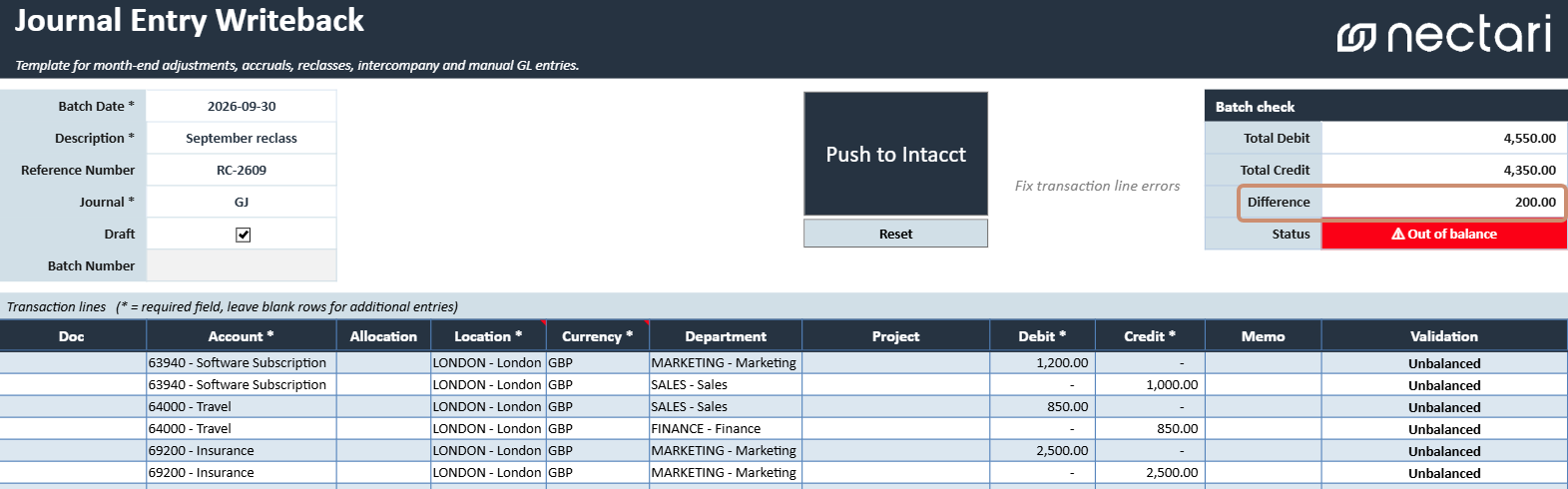
You can write the journal entry back to Sage Intacct only when every required field is complete, no line shows an error, and total debits equal total credits.
- Complete every required (*) field on each line you filled in.
- Correct every error in the Validation column.
- Verify in the Batch Check table that Total Debit equals Total Credit and the difference is zero.
- Confirm that the Status shows OK – Balanced.
The Status shows Out of balance when total debits and total credits don't match. Correct the line amounts until Difference is zero.