FTP(S) External Locations
An FTP(S) external location defines a reusable connection to a remote server, used to transfer distribution files over FTP. A new connection is created as FTPS by default, encrypting the connection to protect data in transit. Turning off Use SSL/TLS switches it to plain FTP instead, transferring files without encryption.
Create an FTP external location
- In the navigation panel, select the gear icon to open the Administration section.
- Select Distribution, then External Locations.
- In the Options panel on the right, click Create a new External Location.
- Next to Type, select FTP.
- (Optional) Turn off Use SSL/TLS to move from FTPS to FTP.
- Enter the connection details.
- Click Save.
Use for distribution
Once saved, the external location becomes available for use in distribution jobs. Selecting the action Export to External Location from the General tab makes it possible to choose that external location.
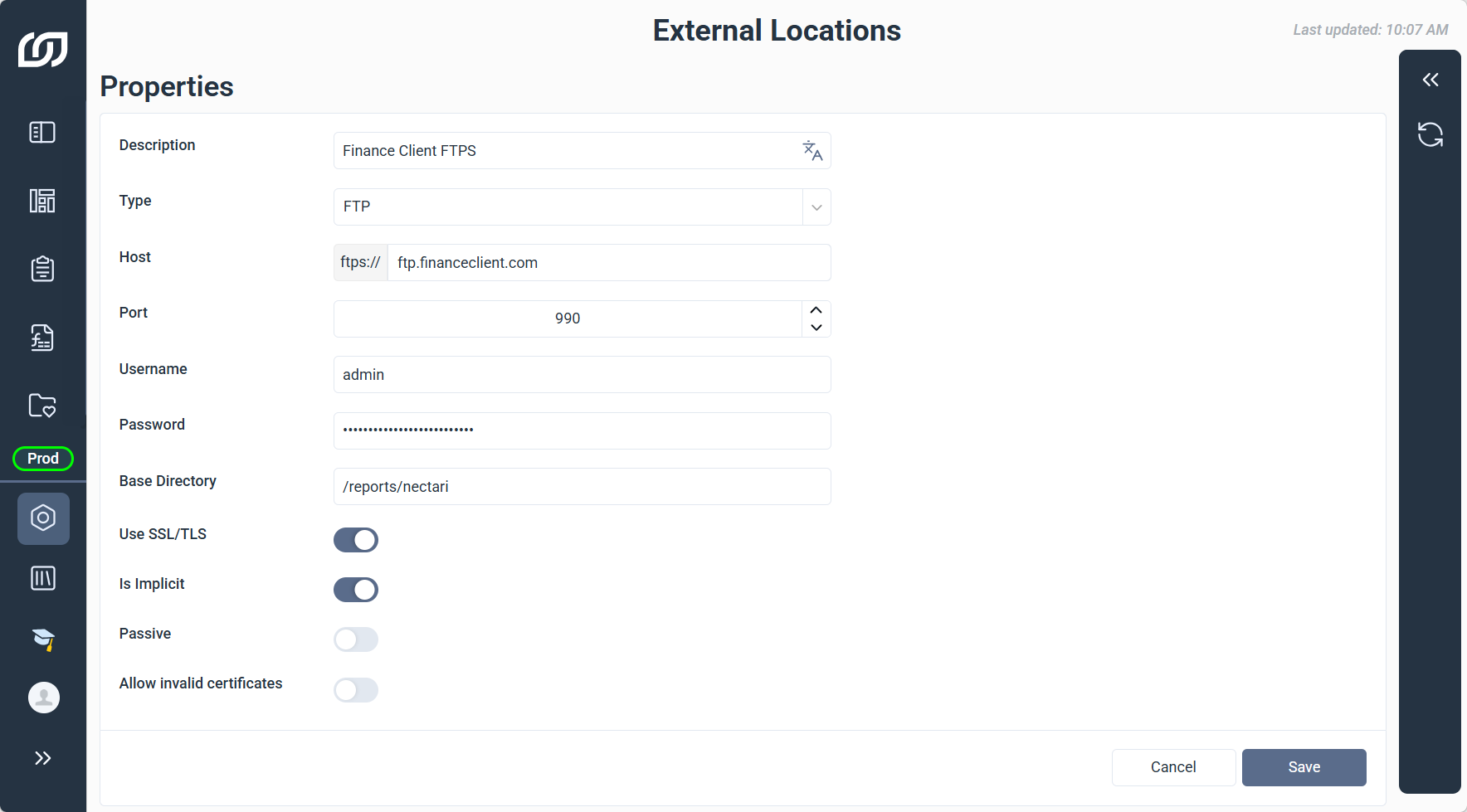
FTP(S) connection details
| FTP(S) Property | What it does |
|---|---|
| Description | Enter a meaningful label to identify the connection. |
| Type | The protocol used for the connection. Selecting FTP also enables FTPS when Use SSL/TLS is turned on. |
| Host | Specify the server address, IP or domain, of the remote FTP server. |
| Port | Specify the communication port. Defaults: 21 for FTP, 990 for FTPS. |
| Username | Enter the username for authenticating with the server. |
| Password | Enter the password associated with the username. |
| Base Directory | Optional Define the root directory for file transfers. Leave blank to use the user's root directory. |
| Use SSL/TLS | Encrypts the connection using TLS, turning it into FTPS, and when turned off, the Host field's prefix updates automatically from ftps:// to ftp://. |
| Is Implicit | Enable implicit mode for FTPS. Available only when Use SSL/TLS is enabled. |
| Passive | Enable passive mode so the file server selects the data channel port. |
| Allow Invalid Certificates | Optional Allow connections to servers with self-signed or expired certificates. |
Allow Invalid Certificates
Allowing invalid certificates reduces connection security, and should only be enabled when necessary, such as connecting to a server with a self-signed internal certificate.