Job Costing
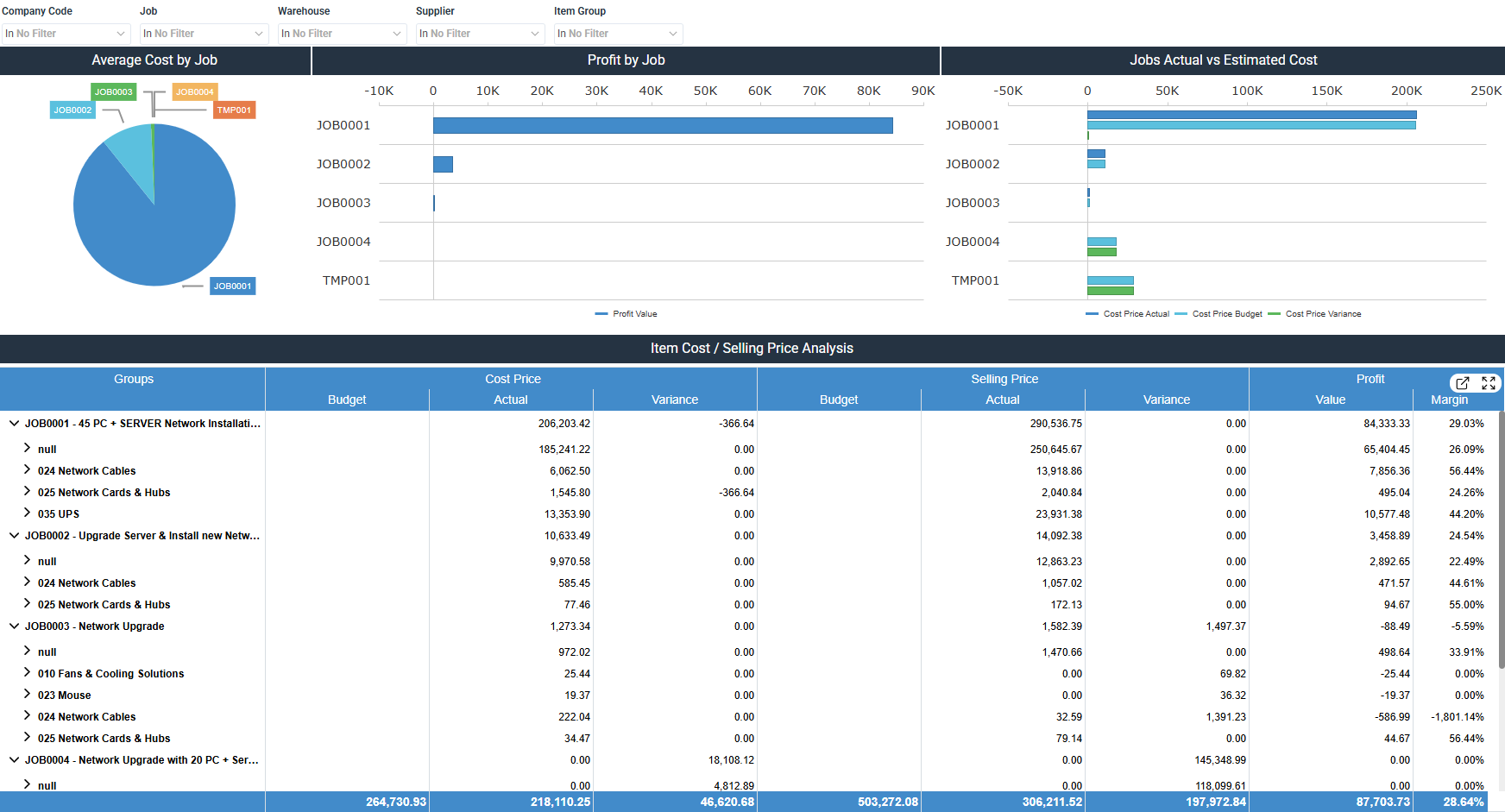
The Job Costing dashboard for Sage 200 Evolution compares job costs, profitability, and budget variances. It includes average cost and profit by job, actual against estimated costs, and item cost and selling price by job.
How to use the job costing dashboard
- Compare average cost and profit across jobs to see which ones stand out.
- Set actual cost against budgeted cost by job to find variances early.
- Check item cost, selling price, and margin by job in the detailed worksheet.
Filters
Use the filtering panel at the top of the Job Costing dashboard to control which data is shown. The filters apply to all views and ensure the dashboard reflects the selections you choose.
Company Code: multiple values
Job: multiple values
Warehouse: multiple values
Supplier: multiple values
Item Group: multiple values
Visual components
| View name | Type of view | What it shows |
|---|---|---|
| Average Cost by Job | Pie | Splits average cost across jobs. |
| Profit by Job | Horizontal Bar | Compares profit by job based on actual against budgeted figures. |
| Jobs Actual vs Estimated Cost | Horizontal Bar | Compares actual cost, budgeted cost, and cost variance by job. |
| Item Cost / Selling Price Analysis | Worksheet | Lists budget against actual costs, selling price, variance, and profit margin by job and item. |