Material Readiness & Constraints
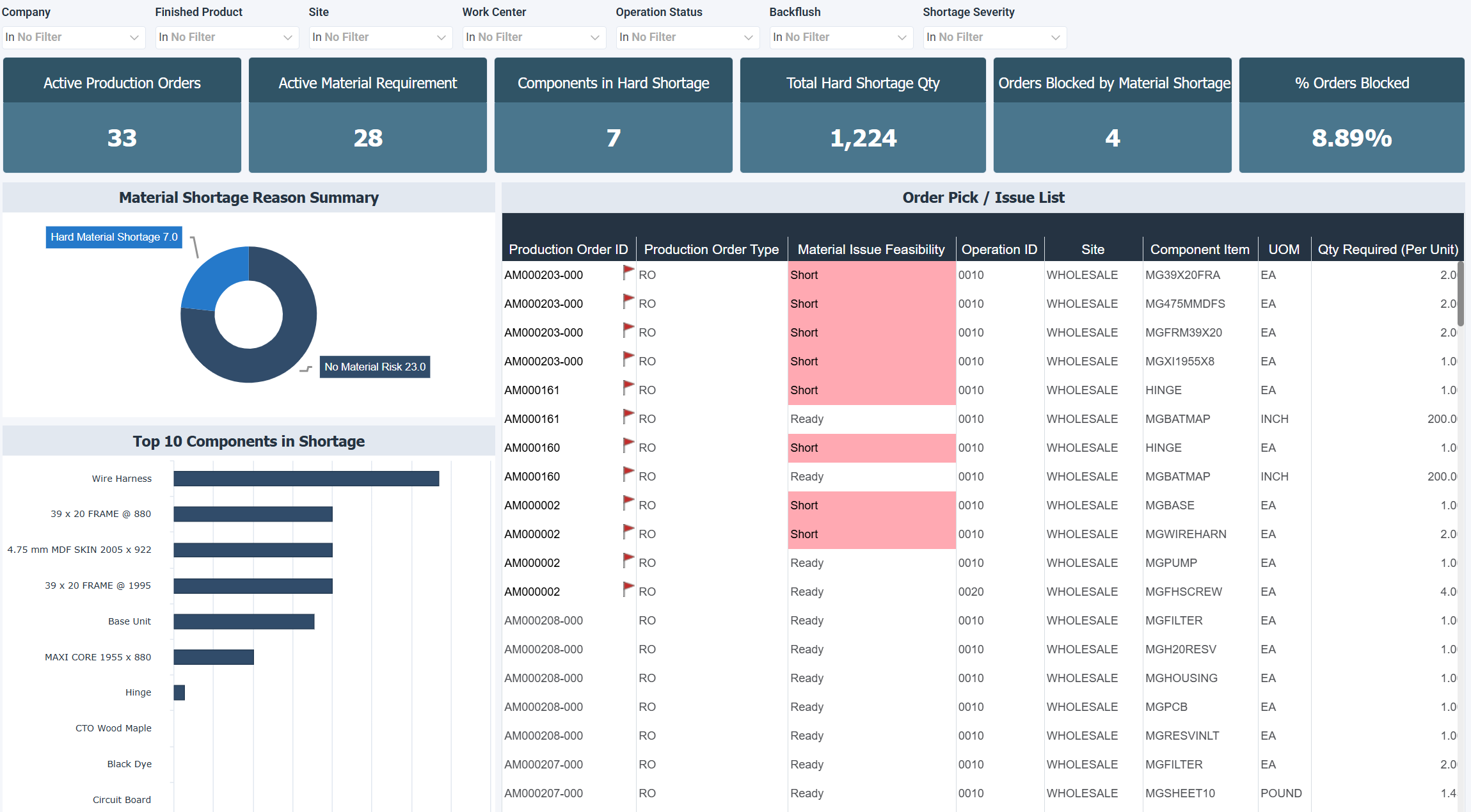
The Material Readiness & Constraints dashboard for Acumatica displays material availability, *shortages, and *production blocking risks. It identifies which components constrain execution and which production orders are ready to proceed.
When you review this dashboard, remember that a single component in shortage can block several production orders at once, so the Top 10 Components in Shortage chart is often the first place to look. If the same components appear there repeatedly, the cause is usually a supplier or planning issue that starts before production. The Order Pick / Issue List shows which orders are ready to go and which are stalled, so you can act on them from that list.
How to use the material readiness and constraints dashboard
- Identify which materials are blocking production with a shortage breakdown.
- Differentiate between available, soft shortage, and hard shortage conditions to prioritize actions.
- Assess which production orders are ready to issue and which are constrained by missing components.
- Focus procurement on the most critical shortages affecting production flow.
- Align production, inventory, and purchasing teams around the same material data, available in real time.
Filters
Use the filtering panel at the top of the Material Readiness & Constraints dashboard to control which data is shown. The filters apply to all views and ensure the dashboard reflects the selections you choose.
Key performance indicators (KPIs)
The key performance indicators (KPIs) at the top of the dashboard show six material availability and shortage measures, and update based on the filters you apply.
| KPI | What it measures |
|---|---|
| Active Production Orders | Number of production orders currently consuming or requiring materials, which shows the overall demand on inventory. |
| Active Material Requirement | Count of distinct material requirements linked to active production orders, which shows how many different materials the production plan depends on. |
| Components in Hard Shortage | Number of component items where available inventory cannot meet remaining production demand, which shows how many components have shortage issues. |
| Total Hard Shortage QTY | Total quantity of material shortfall based on hard availability, which shows the size of the constraints and not only the number of items affected. |
| Orders Blocked by Material Shortage | Number of production orders that cannot proceed because at least one required component is in hard shortage, which counts the orders directly affected. |
| % Orders Blocked | Percentage of active production orders currently blocked due to material shortages. A high value points to an immediate risk to production throughput. |
Visual components
| View name | Type of view | What it shows |
|---|---|---|
| Material Shortage Reason Summary | Doughnut | Splits material status across all requirements into no material risk, soft shortage, and hard shortage to show whether issues are isolated or widespread. |
| Top 10 Components in Shortage | Horizontal Bar | Ranks the components contributing most to shortages to identify procurement priorities and recurring problem materials. |
| Order Pick / Issue List | Worksheet | Lists material readiness for each production order at the line level, with the component, quantity required, and whether the order is Ready or Short. Use it to find exactly what is missing and act on it. |