Import Excel Files as Workbooks
Existing Excel files can be imported into SEI as workbooks. Compatible Excel Add-in features are automatically converted to their workbook equivalents, keeping existing report layouts intact instead of rebuilding them from scratch.
Some Excel Add-in features are not currently supported after importing Excel files: Reporting Tree and Prompts.
Import an Excel file
- In the navigation panel, select Workbooks.
- Right-click and select Import Workbook.
- Drag and drop the Excel file. Supported formats are
.csv,.xlsx,.xlsm, and.xltx. - (Optional) Enter a password if the file is protected.
- Click Import.
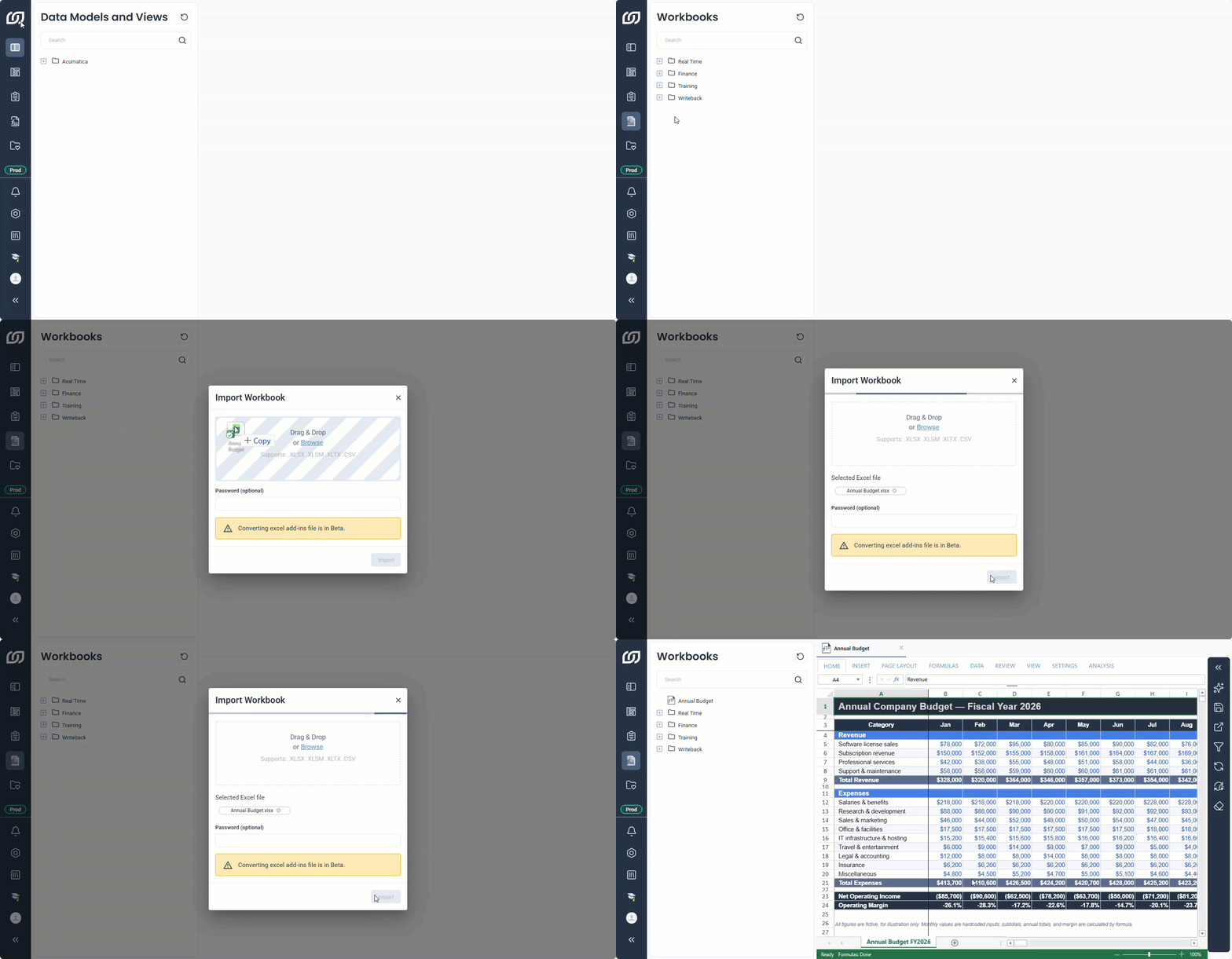
If any cells could not be converted, the workbook includes a sheet named Errors. This sheet lists each affected cell and the reason the conversion failed.
Convert Sage Intelligence reports to workbooks
Sage Intelligence (SI) reports created in Excel can be imported as SEI workbooks, but the conversion only supports SI finance formulas. It works with Sage 100 North America, Sage 200 Evolution, and Sage 300, and the related template must be installed and up to date before you convert a report. Once the template is ready, import the report using a supported file format.
SEI converts SI formulas to NECFORMULA formulas. Only the report is converted, so SI data tables are not included. At the same time, SEI creates a selection page that includes the report's fields. You can edit these fields after the import completes.
Sage Intelligence (SI) adds or subtracts GL accounts directly in a cell, for example 20-2026-072-00-D-GDS + 20-2026-096-00-D-GDS. SEI converts each account to a NECFORMULA and keeps the calculation.
Example
In SI, a cell that adds the balances of two GL accounts contains this formula:
20-2026-072-00-D-GDS + 20-2026-096-00-D-GDS
When that formula is imported into a workbook, each account becomes its own formula. The second NECFORMULA call repeats every filter from the first one, and only the account filter, GLAMF_ACCTFMTTD, changes between the two. The calculation converts to:
=NECFORMULA(
  "CURRENT",
  "450002319",
  "GLAFS_ACTUAL_SI_OPENBAL_M",
  "sum",
  NECFILTERGROUP("AND",
    NECFILTER("CSCOM_AUDTORG","equal",NECSELECTIONPAGEVALUE("##Company")),
    NECFILTER("SERVER_FLD0000001","equal",NECSELECTIONPAGEVALUE("##Fiscal_Period_fmt")),
    NECFILTER("GLAFS_ACTUAL_SI_FSCSCURN","equal","CAN"),
    NECFILTER("GLAFS_ACTUAL_SI_CURNTYPE","equal","S"),
    NECFILTER("GLAMF_ACCTFMTTD","equal","20-2026-072-00-D-GDS")
  )
)
+NECFORMULA(same arguments, with GLAMF_ACCTFMTTD equal to "20-2026-096-00-D-GDS")
Formulas in SEI always start with =NECFORMULA. Unlike SI, these formulas don't require a space around + or -.